z3r0_dark_30
-
Posts
14 -
Joined
-
Last visited
-
csCoins
161 [ Donate ]
Everything posted by z3r0_dark_30
-
 Hey, ich wäre sehr interessiert! falls noch tester benötigt werden! :)
 -
Hi, was geht, Je nachdem nach was du konkret suchstt - bin ich davon überzeugt dass wir nach ein wenig Rück- und Absprache bestimmt geeignete Lösungen finden finden und die gemeinsame Arbeit füt unss beide Profitbabel ist. Kurz Zu meiner Erfahrung asl Entwickler: Habe Kenntnisse in .Net/c#, scriptsprachen wie bash und PS, meine stärken liegen jedoch im Entwickeln ganzer full stack anwendungen (bzw front und backend, manchmal auch db). Darüber hinaus habe ich viele fachkenntisse in der Entwicklung von Offensive Security Tooling, sprich Angrifftools, sowie auch Malware und RATs. um all deinen Erwartungen und Vorstellungen ,mit auhtentischer Webpräsen gerecht zu werden bin ich mir sicher, wir können gut einandner helfe!, Schreib mir gerne per PM Chat in cstate dann oder auf session geht auch 0 | D A R K | 30
-
Preiswerter Domain Provider gesucht
z3r0_dark_30 replied to z3r0_dark_30's topic in Fragen & Antworten
War schon sehr hilfreich, besten dank dafür. In erster linie geht es mir darum ganz allgemein bulletproof web hosting provider zu sammeln, bzw zu sehen was gerne genutzt wird und zur zeit beliebt ist :) Beste Grüße! -
Hallo liebe Community, ich suche nach einem bulletproof domain provider, idealerweise web hosting inkludiert. War immer bei privatealps aber würde mich interessieren was gute alternativen sind, EURER meinung nach! :-) LG!
-
Coding einer App und Sie in den Playstore einbinden
z3r0_dark_30 replied to Fraudpaket's topic in Coding/GFX
Wäre es möglich via Session zu kommunizieren? Wäre Ehre. LH -
Hi, das ist kein Problem. Kann dir auch eine schöne GUI als Web/Admin Panel oder eine Desktop Anwendung mit dazu liefern, sofern gewünscht. Bei Interesse schreib mir gerne per PM! Beste Grüße.
-
Coding einer App und Sie in den Playstore einbinden
z3r0_dark_30 replied to Fraudpaket's topic in Coding/GFX
Hi, habe skills in Smali und Java, Code Obfuscation der Malware, welche über die App eingebunden werden soll wäre auch kein Problem (Sofern ich dich richtig verstanden habe). Schreib mir gerne per PM was du dir im Detail vorstellst. Coole Projekt Idee! Liebe Grüße. -
Push
-
SUCHE - KLAZ Self Created / Aged 2 Weeks old / Top Score mit Aufwärminserat PM oder Session willkommen, bei Angeboten gerne einfach kontaktieren. Nur konkrete Biete Anfragen - No Timewasters pls. Danke vorab!
-
0DARK30 Custom Development Projects Hacking Services Offering (Phishing, Malware Preparation) Security Consulting Schnelle Antworten und Kundenservice nach Zufriedenheitsgarantie. Gemeinsame Projekte und Collaborators sind gerne und jederzeit willkommen und können per PM angefragt werden. Happy Hacking! 0DARK30
-
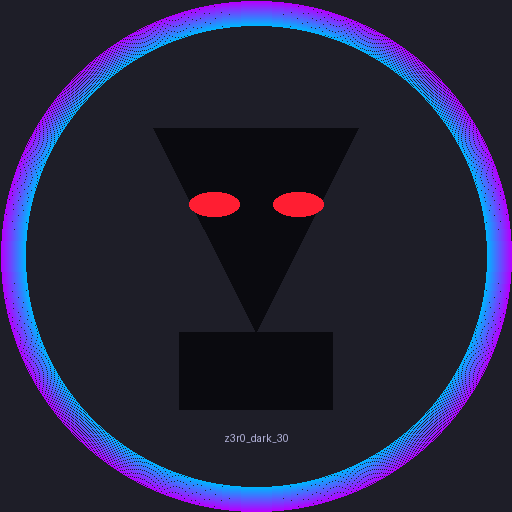
[] PYTHON3 - Creating and Cleaning a Stylized Avatar (and Why EXIF Data Matters) The script starts by building a simple but striking emblem: a hooded figure with glowing eyes, framed by a gradient border. It uses Pillow (PIL) to layer geometric shapes (triangles, rectangles, ellipses) on a dark background, then writes the username below the emblem. But the more important part comes after the artwork is generated — making sure the output is safe to share. Why remove EXIF metadata? Whenever you save an image (especially with cameras or phones), it usually carries EXIF metadata: Camera model, lens, GPS coordinates, timestamps Even software that last edited it That’s useful for photographers, but dangerous when publishing online — you might be leaking location or device info. If we’re generating avatars, we want them to be clean PNGs with no personal data embedded. Stripping EXIF with Pillow Luckily, Pillow makes this very easy. After generating the image, you can “sanitize” it by re-saving without copying over any existing metadata: from PIL import Image def remove_exif(input_path, output_path): img = Image.open(input_path) data = list(img.getdata()) # raw pixel values clean_img = Image.new(img.mode, img.size) clean_img.putdata(data) clean_img.save(output_path) print(f"Saved EXIF-free image: {output_path}") How it works: Open the original file. Extract only the pixel data. Rebuild a new image from scratch. Save it fresh — no metadata is carried over. Now your avatar is guaranteed to be metadata-free. The full pipeline Generate the hooded emblem (gradient ring + figure + glowing eyes + username). Save the raw PNG. Immediately run it through the remove_exif function. End result: a stylized avatar that’s not only visually unique but also privacy-safe for use as a profile picture, game avatar, or social media icon. Image Generation Python Script import hashlib from PIL import Image, ImageDraw, ImageFont def generate_hood_emblem(username, size=512, output_path="emblem_avatar.png"): """ Create a stylized hooded avatar emblem with username. username: string to seed colors and generate text. size: image size in pixels. output_path: filename for output image. """ # Create a base image img = Image.new("RGBA", (size, size), (30, 30, 40, 255)) draw = ImageDraw.Draw(img) # Generate a gradient circle border border_thickness = size // 20 inner_radius = size // 2 - border_thickness center = size // 2 # Color gradient (blue to magenta) def lerp(c1, c2, t): return tuple(int(c1[i] + (c2[i] - c1[i]) * t) for i in range(3)) color_start, color_end = (0, 180, 255), (180, 0, 255) for i in range(border_thickness): t = i / (border_thickness - 1) if border_thickness > 1 else 0 color = lerp(color_start, color_end, t) draw.ellipse( [center - inner_radius - i, center - inner_radius - i, center + inner_radius + i, center + inner_radius + i], outline=color + (255,) ) # Draw a hooded cloak: simple triangle shapes hood_color = (10, 10, 15, 255) draw.polygon([ (center * 0.6, center * 0.5), (center * 1.4, center * 0.5), (center, center * 1.3) ], fill=hood_color) draw.rectangle([ (center * 0.7, center * 1.3), (center * 1.3, center * 1.6) ], fill=hood_color) # Add glowing "eyes" eye_color = (255, 30, 50, 255) eye_w, eye_h = size // 20, size // 40 eye_y = center * 0.8 eye_x_offset = size // 12 draw.ellipse( [(center - eye_x_offset - eye_w, eye_y - eye_h), (center - eye_x_offset + eye_w, eye_y + eye_h)], fill=eye_color ) draw.ellipse( [(center + eye_x_offset - eye_w, eye_y - eye_h), (center + eye_x_offset + eye_w, eye_y + eye_h)], fill=eye_color ) # Render username text below emblem try: font = ImageFont.truetype("arial.ttf", size // 8) except IOError: font = ImageFont.load_default() text = username # ✅ Works with new Pillow bbox = draw.textbbox((0, 0), text, font=font) text_width = bbox[2] - bbox[0] text_height = bbox[3] - bbox[1] text_position = ((size - text_width) / 2, size * 0.82 + eye_h) draw.text(text_position, text, font=font, fill=(180, 180, 220, 255)) # ✅ Save the image img.save(output_path) print(f"Emblem avatar saved to {output_path}") if __name__ == "__main__": generate_hood_emblem("z3r0_dark_30", size=512, output_path="zd30.png") Have Fun! Your Dark Coder, 0DARK30