Search the Community
Showing results for tags 'rat'.
Found 8 results
-
Hallo zusammen, ich bin auf der Suche nach aktuellen Online-Banking-Daten, insbesondere für die folgenden Banken: Volksbank (Voba) Sparkasse (Spk) Ich akzeptiere alle Daten, solange der Preis stimmt und die Telefonnummer dabei ist. Ich bin offen für Preisverhandlungen, also macht mir gerne ein Angebot. Bitte teilt mir mit, welche Daten ihr anbietet, und wir können dann über den Preis und die weiteren Details sprechen. Vielen Dank im Voraus und beste Grüße
-
🛡️ Sicherer Umgang mit Software von unbekannten Herausgebern Im Internet gibt es unzählige Programme, Tools und Anwendungen. Leider sind nicht alle Downloads vertrauenswürdig. Schadsoftware kann als legitime Software getarnt sein und dein System kompromittieren, Daten stehlen oder Angreifern sogar vollständigen Fernzugriff auf deinen Computer ermöglichen. Dieser Beitrag erklärt die wichtigsten Sicherheitsmaßnahmen, die jeder beachten sollte. ⚠️ Risiken beim Download von Software unbekannter Herausgeber Das Herunterladen von Software aus unbekannten oder nicht vertrauenswürdigen Quellen kann folgende Risiken mit sich bringen: 🔴 Remote Access Trojaner (RATs) Angreifer erhalten vollständigen Fernzugriff auf deinen Computer. 🔴 Information Stealer Stehlen Passwörter, Browser-Cookies, Kryptowallets und persönliche Daten. 🔴 Keylogger Zeichnen Tastatureingaben auf und erfassen sensible Informationen. 🔴 Ransomware Verschlüsselt Dateien und fordert Lösegeld. 🔴 Backdoors Ermöglichen Angreifern einen späteren erneuten Zugriff auf das System. 🔍 Dateien mit VirusTotal prüfen Ein sehr hilfreiches Werkzeug ist: 🧪 VirusTotal VirusTotal scannt Dateien oder URLs gleichzeitig mit zahlreichen Antiviren-Engines. Vorteile: Erkennt bekannte Schadsoftware Zeigt Verhaltensanalysen Liefert Community-Bewertungen Hilft bei der Identifizierung verdächtiger Dateien ⚠️ Wichtig: Ein sauberer VirusTotal-Scan bedeutet nicht automatisch, dass die Datei sicher ist. Neue oder speziell angepasste Malware kann unentdeckt bleiben. 🖥️ Virtuelle Maschinen (VMs) verwenden Eine Virtuelle Maschine (VM) ermöglicht das Ausführen von Software in einer isolierten Umgebung. Beliebte Lösungen: VMware Workstation VirtualBox Hyper-V Vorteile: ✅ Trennung vom Hauptsystem ✅ Snapshots für schnelle Wiederherstellung ✅ Sicherere Testumgebung ✅ Geringeres Risiko einer dauerhaften Infektion Auch wenn moderne Malware teilweise VMs erkennen kann, stellen sie weiterhin eine wichtige zusätzliche Sicherheitsschicht dar. 🌐 RDP-Server nutzen Viele erfahrene Nutzer und Sicherheitsforscher testen unbekannte Software auf separaten Systemen über Remote Desktop Protocol (RDP). Vorteile: ✅ Das Hauptsystem bleibt geschützt ✅ Verdächtige Aktivitäten können isoliert werden ✅ Bessere Kontrolle und Überwachung Unbekannte Dateien sollten möglichst nicht direkt auf dem produktiven Rechner ausgeführt werden. 🔒 VPN oder Proxy verwenden VPNs und Proxys bieten zusätzliche Privatsphäre und Schutz. Vorteile: ✅ Verbergen die echte IP-Adresse ✅ Reduzieren direkte Netzwerkexposition ✅ Erhöhen die Privatsphäre beim Besuch unbekannter Webseiten Wichtig: ⚠️ Ein VPN verhindert keine Malware-Infektionen. ⚠️ Ein VPN macht unsichere Software nicht sicher. VPNs sind eine zusätzliche Schutzschicht – kein Ersatz für sichere Verhaltensweisen. 🚫 Wie man eine RAT-Infektion verhindert 1. Keine zufälligen Dateien ausführen Vermeide Downloads von: Unbekannten Discord-Nutzern Fragwürdigen Forenbeiträgen Unbekannten Filehostern Verdächtigen Archiven 2. Windows aktuell halten Regelmäßige Updates schließen bekannte Sicherheitslücken. 3. Antivirenprogramm verwenden Aktuelle Sicherheitssoftware erkennt viele RATs bereits vor der Ausführung. 4. Administratorrechte einschränken Programme nur dann mit Administratorrechten ausführen, wenn es wirklich notwendig ist. 5. Autostart-Einträge kontrollieren Überprüfe regelmäßig: Autostart-Ordner Geplante Aufgaben Registry-Autostart-Einträge 6. Firewall aktivieren Firewalls können verdächtige Netzwerkverbindungen erkennen und blockieren. 7. Multi-Faktor-Authentifizierung (MFA) aktivieren Selbst bei gestohlenen Zugangsdaten bleiben Konten besser geschützt. 🚨 Warnsignale erkennen Sei vorsichtig, wenn Software: ❌ Kostenpflichtige Funktionen kostenlos verspricht ❌ Das Deaktivieren des Antivirenprogramms verlangt ❌ Von neu erstellten Accounts verbreitet wird ❌ Passwortgeschützte Archive ohne Erklärung nutzt ❌ Unnötige Administratorrechte fordert ❌ Keine offizielle Webseite oder Dokumentation besitzt 🎯 Fazit Sicherheit basiert auf mehreren Schutzebenen: 🛡️ Quelle überprüfen 🛡️ VirusTotal verwenden 🛡️ Unbekannte Software in einer VM testen 🛡️ Isolierte RDP-Systeme nutzen 🛡️ VPN/Proxy für zusätzliche Privatsphäre verwenden 🛡️ System aktuell halten 🛡️ Immer kritisch denken Die sicherste Malware ist die, die niemals ausgeführt wird. Bleibt sicher und prüft immer, bevor ihr vertraut. 🔐 VirusTotal: Link RDP/VPS: KYC / NON-KYC LG Sorrow
-
 # Silent Crypto Miner Builder v4.1.0 - Major Update Release ## 🚀 What's New ### 🔒 Tor Support Full Tor integration for anonymous mining operations with automatic proxy routing and `.onion` address support. Your mining traffic is now completely anonymous. ### 🎯 Windows 11 Smart Injection Advanced injection technique optimized for Windows 11 with automatic fallback mechanism. Uses modern `ghostly_hollowing` first, falls back to classic `process_hollowing` if needed. Enhanced stealth capabilities on Windows 11 Build 22000+. ### 🔧 Technical Improvements - Memory-mapped file approach for payload injection (reduces detection) - Pre-warming memory pages to avoid page fault storms ## Xmrig 6.24.0 Integration ### 🔐 Privacy & Security - Encrypted POST requests to the panel - all data transmitted securely - Enhanced memory protection - confidential data hidden from process analysis - Professional security standards - passwords and wallet addresses protected ### 🎭 Advanced Stealth System Smart Jitter Delays: - Intelligent pauses (7-12 sec base, up to 45-60 sec when needed) - Activity-responsive delays - adapts to user input - Unique timing per miner to avoid pattern detection Smooth Ramp Up: - Gradual CPU load increase (starts at 10 threads, adds 10% every ~60 sec) - No sudden temperature spikes or fan noise - Natural "waking up" behavior Triggers: - Fullscreen detection (games, videos, presentations) - Process monitoring (Task Manager, process monitors) ### 💰 Backup Pools - Zero Downtime Mining - Automatic failover to backup pools during main pool failures - Full autonomy - continues mining even if remote config is lost - Real-time pool status monitoring (HEALTHY, DEGRADED, UNSTABLE, BANNED) - Transparent diagnostics - see exactly why switches occurred ### 📊 Enhanced Control Panel - Real-time pool statuses - see health of all pools instantly - Smart configuration rules - automatic switching during problems - Miner ranking system - best performers at the top - Maximum hashrate indicator - see real potential vs current performance - Connection monitoring - built-in analytics for pool status and errors ### 🌐 Network Request Randomization - Random User-Agents (masquerades as browsers) - Randomized request intervals (±10% variation) - Unpredictable connection patterns - Result: Network traffic indistinguishable from regular user activity ### 🎭 Control Panel Obfuscation - Random file and folder names (login.php, assets/, etc. renamed) - Hidden API endpoints and CSS/JS functions - Unique structure per installation - Protection: Automatic scanners cannot find the panel ## Why Upgrade? ✅ More Secure - Encrypted communications, memory protection, panel obfuscation ✅ More Invisible - Advanced stealth with smart delays and smooth load management ✅ More Stable - Backup pools ensure continuous mining ✅ More Anonymous - Full Tor support for complete privacy ✅ Better Control - Enhanced panel with real-time monitoring and diagnostics ✅ Windows 11 Ready - Optimized injection for latest Windows builds Bottom Line: v4.1.0 brings professional-grade stealth, security, and reliability. Your miners will be more invisible, more stable, and more profitable. Silent Crypto Miner Builder v4.1.0 - When stealth meets reliability https://drive.proton.me/urls/QQTNDZA2N8#MOEX3L3zpb0t
 -
Introduction: Hello everyone, This is Jinu. I'm very glad to share this tutorial with you. I know there are plenty of same kind of tutorials available here. Hence, many folks are struggling to understand it and having lots of questions about RAT (Remote Administration Tools). Here I started this tutorial from Basic to Advance. So everyone can understand how to handle the RAT and If they have any questions or problems, that too will get solved easily.This I share with you is what I have learned and with my experience. This tutorial is brought you by the great group RedLions. Okay, let us move on. What is a RAT (Remote Administration Tool)? RAT is an acronym of Remote Administration Tool. It's a program or software. What a RAT allows you to do is to take full control of another one's computer without their knowledge. There are many RATs (Remote Administration Tools) available in the market with different features. They are including free RATs and paid RATs. You can see all the RATs currently available in the market here. How does it work (Working model)? With the help of Remote Administration Tool, you will create one "Program". That is called "Server.exe". Once you send that to your friends or enemies, If they click that file, their computer details will be seen in your RAT. So you can control their PC, steal their passwords, watch their activities etc... without their knowledge. How to make your PC ready before start RATing? While opening RAT, creating server.exe, opening ports, outgoing-incoming connections, your Anti-Virus or your firewall won't allow this process. It will affect your RATing process. So you need to completely disable your Anti-virus, firewall, and any other blocking software. Okay, we move on to the next step. What are the things require before you start RATing? The Remote Administration Tool alone will not help you to RAT, someone. It requires some other tools too. Here are the list:Spoiler How to setup a RAT? In this tutorial, I have chosen the RAT called DarkComet 5.3. And many of the RAT will have almost same settings like this. The setup process will consist of: Creating no-IP account. Or creating FreeDNS account. Setup DUC client. Or setup FreeDNS client. Setup your RAT. Portforwarding. Crypting Spreading 1. Creating no-IP account or Creating FreeDNS: Creating no-ip account (Click to View) or Creating FreeDNS account (Click to View) 2. Setting up the DUC client or Setting up the FreeDNS client: Setting up the DUC client (Click to View) or Setting up the FreeDNS client (Click to View)
-
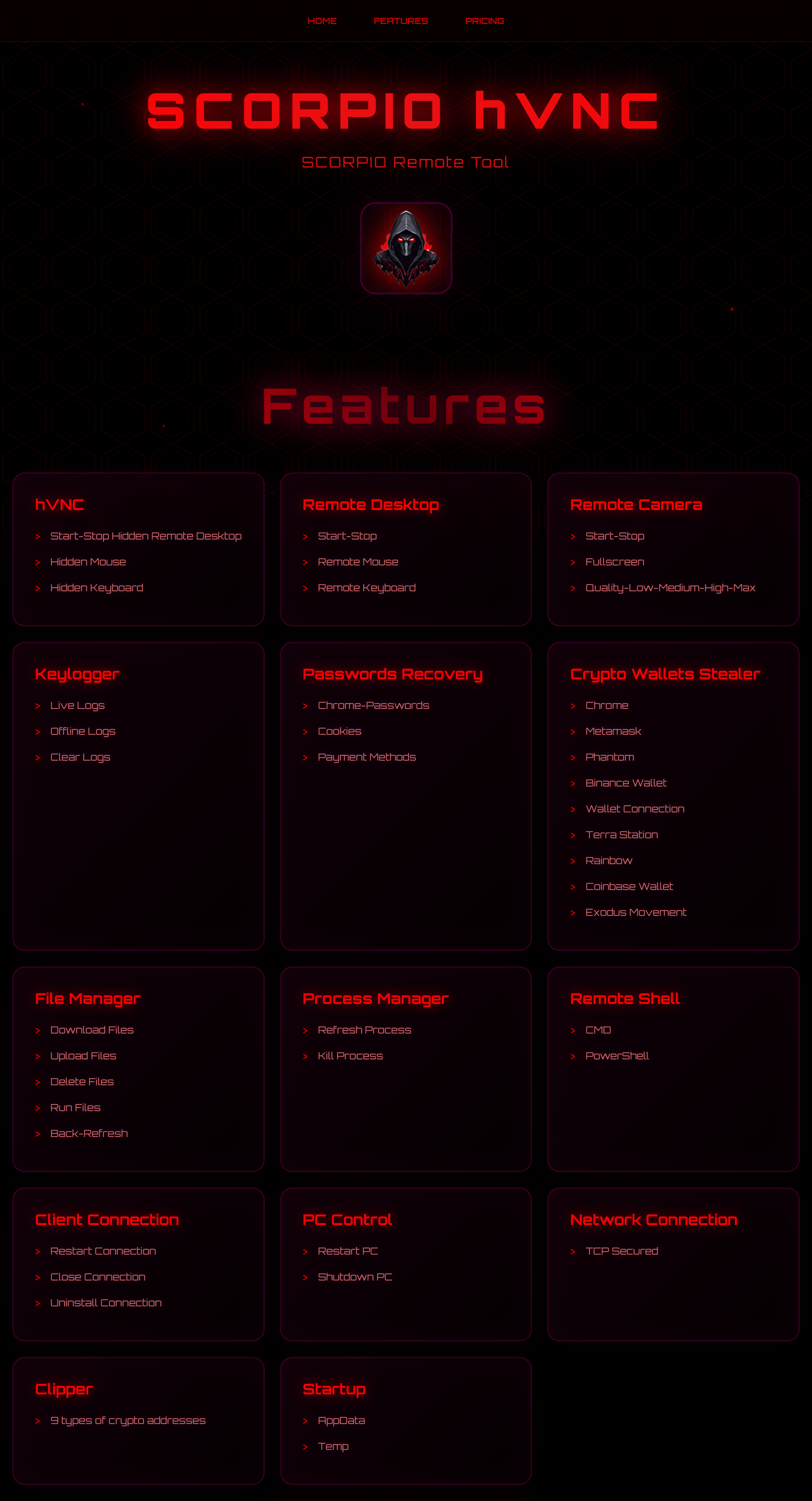
Anonymous VPS https://darkvps.pro Free Version https://scorpiocrypter.cc/ScorpioReleased.rar Password: Scorpio Quick Review of Scorpio RAT free Version: https://scorpio-software.com/Scorpio.mp4
-
NCrypt is my first crypter project, ever. Since starting this project I have started & released side projects, worked on prototypes, and even have another brand new similar codebase in the works. However, NCrypt holds its own! I am releasing NCrypt as a starter kit for anyone wanting to protect their own programs, intellectual property, and data. NCrypt can help you learn the building blocks of how a crypter works, while being ready to use as-is too! NCrypt is ideal if you don't have a dev setup because it contains a tiny C compiler inside of it. This means you can modify the Stub.c file whenever you want and the next time you use NCrypt.exe, it will use the new code from there! By choosing to click & reveal the spoiler below, you agree you will only use NCrypt on your own personal devices for authorized, legal uses, and for whitehat purposes only. Clicking the spoiler below for any other use is prohibited, against my terms of service, and violates the license agreement of this codebase & associated tools. If you still agree, you can view the source code here: https://github.com/LNodesL/NCrypt Programs (pre-compiled): Code https://github.com/LNodesL/NCrypt/raw/main/dist/NCrypt-Release-Programs-0.0.1.zip https://github.com/LNodesL/NCrypt/raw/8f10b1eb54d920102da4189160e536ecaf62d062/dist/NCrypt-Release-Programs-0.0.1.zip https://www.mediafire.com/file/m6j0fucp230rl2a/NCrypt-Release-Programs-0.0.1.zip/file https://mega.nz/file/gr0Czbba#PLM2lOnbua4Cujl0Hw5x53RniFZK13eboSgzs_qlqfU ******************************************************************************************************* Grundsätzlich gilt: Virusscan und VM ist euer Freund. Da die meisten geuppten Tools Stealer, Rats, Bots etc. sind wird fast jedes AV eine Warnmeldung abgeben. „Klingt komisch, ist aber so" Das ist bei diesen Programmen normal, macht die Sache aber für Anfänger nicht besser! Darum immer eine VM (https://www.heise.de/download/product/virtualbox-40385) nutzen. Btw: Die Tools sind nicht von mir! Wie sagt man so schön: Das ist alles nur geklaut und gestohlen, nur gezogen und geraubt. Entschuldigung, das hab ich mir erlaubt.
-
nodes-crypter | npm package | C++ Javascript Crypter Today you will learn how to take a C/C++ program, encrypt it with XOR and then execute it, all using Javascript with this easy-to-use npm package. Take your static or dynamic compiled program and protect its runtime by utilizing a tmp file and run it in a child process, all from a JS file! You heard that right - your program's encrypted binary will be stored inside of a final script "run.js", which you can then run with "node run.js" to inject the embedded C/C++ program and run it as normal. Code npm install -g nodes-crypter Tested on Linux & Windows run command: nodes-crypter ./original-cpp-program secretKeyPhraseHere nodes-crypter will generate a file: run.js run command: node run.js your original C++ program will be decrypted (inside of run.js) and run as a program https://www.npmjs.com/package/nodes-crypter/v/1.0.6 This is an example of how you can use JS in unique ways due to npm & node. This method of encrypting and then decrypting, pushing to a tmp file & running as a child process is a proof of concept. You are free to learn from it, use it for personal use, and enhance the codebase - within limits of its license & npm TOS. The main file is node-crypter's only bin script, which encrypts your original program using XOR. Code const xorEncrypt = (input, key) => { const keyBuffer = Buffer.from(key); const output = Buffer.alloc(input.length); for (let i = 0; i < input.length; i++) { output = input ^ keyBuffer[i % keyBuffer.length]; } return output; }; Similarly, the final run.js file has a decrypt function: Code const xorDecrypt = (input, key) => { const keyBuffer = Buffer.from(key); const output = Buffer.alloc(input.length); for (let i = 0; i < input.length; i++) { output = input ^ keyBuffer[i % keyBuffer.length]; } return output; }; The run.js file will decrypt the program (encrypted binary held inside of run.js) & push it to a tmp file: Code const tempPath = path.join('/tmp', 'decrypted_program'); fs.writeFileSync(tempPath, decryptedData); fs.chmodSync(tempPath, '755'); Then, it runs the tmp file using the exec() function. This is a basic method, mostly meant to highlight the capabilities of using an npm package to handle the "build process", and using node to handle the runtime. You can always use other runtime methods instead, and add other build steps too. I hope you enjoyed this & if you learned anything, please say a thank you below. If you have any questions or suggestions, feel free to reply!! ******************************************************************************************************* Grundsätzlich gilt: Virusscan und VM ist euer Freund. Da die meisten geuppten Tools Stealer, Rats, Bots etc. sind wird fast jedes AV eine Warnmeldung abgebeben. Das ist bei diesen Programmen normal, macht die Sache aber für Anfänger nicht besser! Darum immer eine VM (https://www.heise.de/download/product/virtualbox-40385) nutzen. Btw: Die Tools sind nicht von mir! Wie sagt man so schön: Das ist alles nur geklaut und gestohlen, nur gezogen und geraubt. Entschuldigung, das hab ich mir erlaubt.
-
1. Download QuasarRAT. https://github.com/q...sarRAT/releases 2. Order nVPN (Dedicated IP $8,00/mo) + BP Domain(Backup) nVpn.net - 100% Safe | NO Log VPN | Anonymous VPN | OpenVPN, Squid & Socks5 Proxy, L2TP/IPSec(IKEv1/2) | Portforward | Shared/Dedicated IP https://anotld.cc/ (BP Domains at 10$) After you order it, you will receive email with details to yours account, follow the guide that you receive on the email to get access to the vpn. Now you can open your port, after that connect to the VPN. 3. Extract and open QuasarRAT After that go to settings tab and put the port that you have open before, after that click "Start Listening" and click safe. 4. Builder Settings. Go to the builder tab, and connection settings put IP of your vpn in IP/Hostname section and port that you have open it before on nvpn website. 5. Installation Settings: First what you have to do is select "Install Client" after that change subdirectory and install name and change it to hidded if you want, and the last thing that you can do is change the startup name for something like "svchost" etc. 6. Surveillance Settings: The last thing before building the file is "Enable Keyboard Logging" and set the attributes to hidded and now finally click "Build" button, set the name on your file and save it on your desktop.